| This article is under construction and may contain incomplete and/or inaccurate information. |
This article serves as a quick introduction to Arknights, including how to download/install the game and the essentials in playing the game.
Starting up
Installation
You may download Arknights from the Play Store, App Store, or for the Chinese version of the game, on Hypergryph's website at the following URL: ak.hypergryph.com/download (only for Android). It is possible to download the game from other providers, such as QooApp, but we recommend using the official methods.
On Android, Arknights requires Android version 4.1 and up, and runs on any 32-bit image. It does not require a 64-bit Android instance, making it easy to run on any emulators you may find. It demands approximately 3.5 gigabytes of space with all packages installed, despite Google Play's size claim of 86 megabytes, and the closer estimate of 1.52 gigabytes of the CN version's package.
On iOS, Arknights requires iOS version 9.0 or later, and is a 2.1 gigabyte download. Though untested, it should also run on 32-bit devices, of which are a minority of Apple devices.
It is worth noting that game content is downloaded in two separate ways. Google Play will initially download a 84.56 megabyte application, and a 1.53 gigabyte OBB package (what Google Play refers to as the additional file). Without getting into specifics, the initial application download contains most of the initial game code, while the OBB package contains the initial content. Most post-launch content is then downloaded in the game itself, through the loading screen that precedes login. Skipping the download of any of these files is not permitted.
This adds up to the 3.5 gigabytes in total, although during this patching process, you may chose to skip on the voice lines — which will render your operators silent — and the video resources — which are only used after the Episode 8 stage JT8-2, leaving you ample time as a new player to progress in the game before actually needing to download the file, which you can do at any time from the in-game Settings.
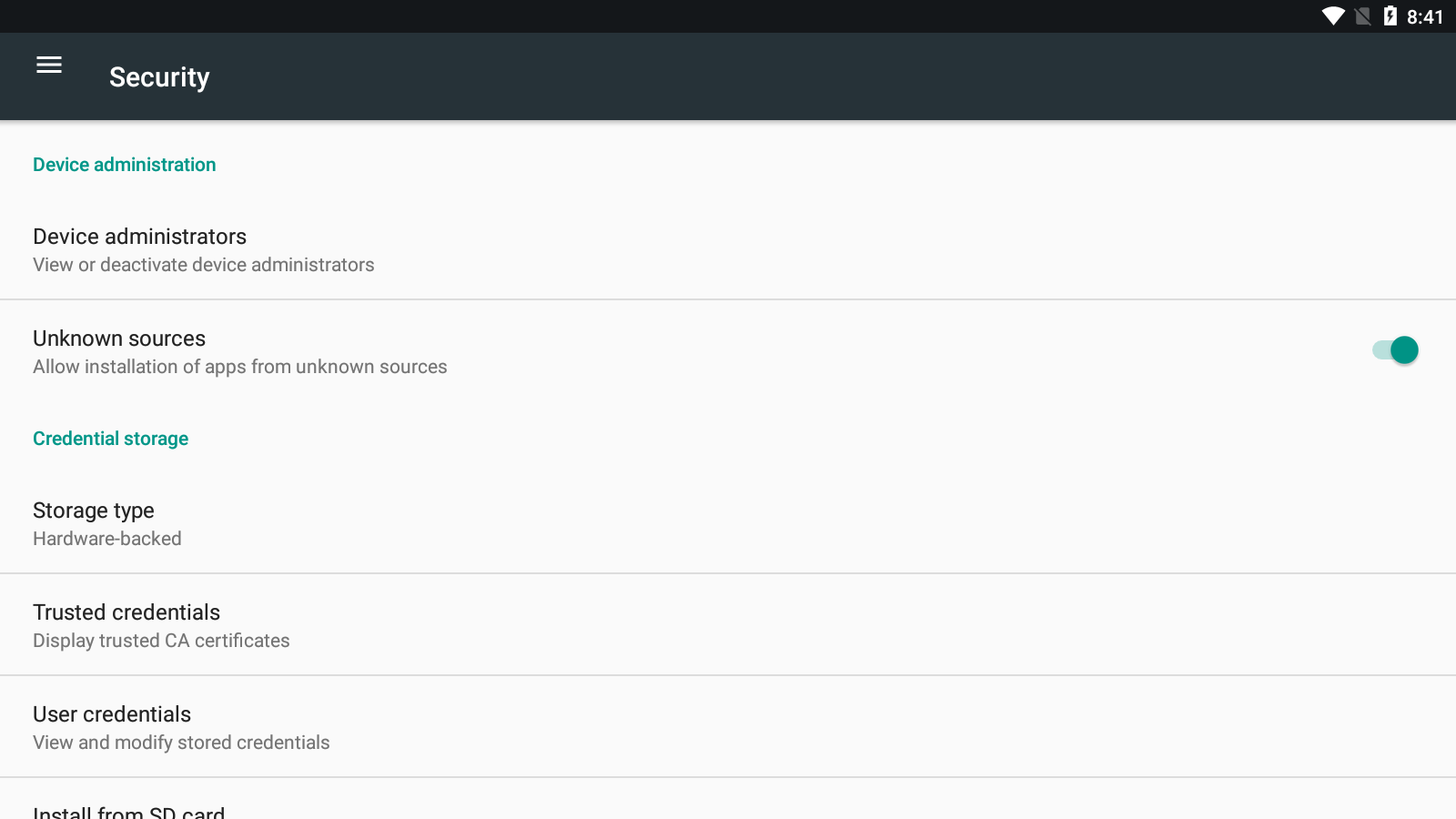

Allow installation of apps from unknown sources.
If you are installing the Chinese version of the game, you will be downloading an APK file, which is, to simplify, the Android equivalent of a Windows installer .exe. The APK file can be executed by any Android emulator or Android itself, and will allow you to install the application on your device. Since the Chinese version uses an XAPK structure, content is included in the APK, which means it does not download an OBB. However, you will still have to go through the patching process within the game itself. In order to install this version of the game, you will have to go into your Android device's settings, and "allow installation of apps from unknown sources," which is usually found in the Security section.
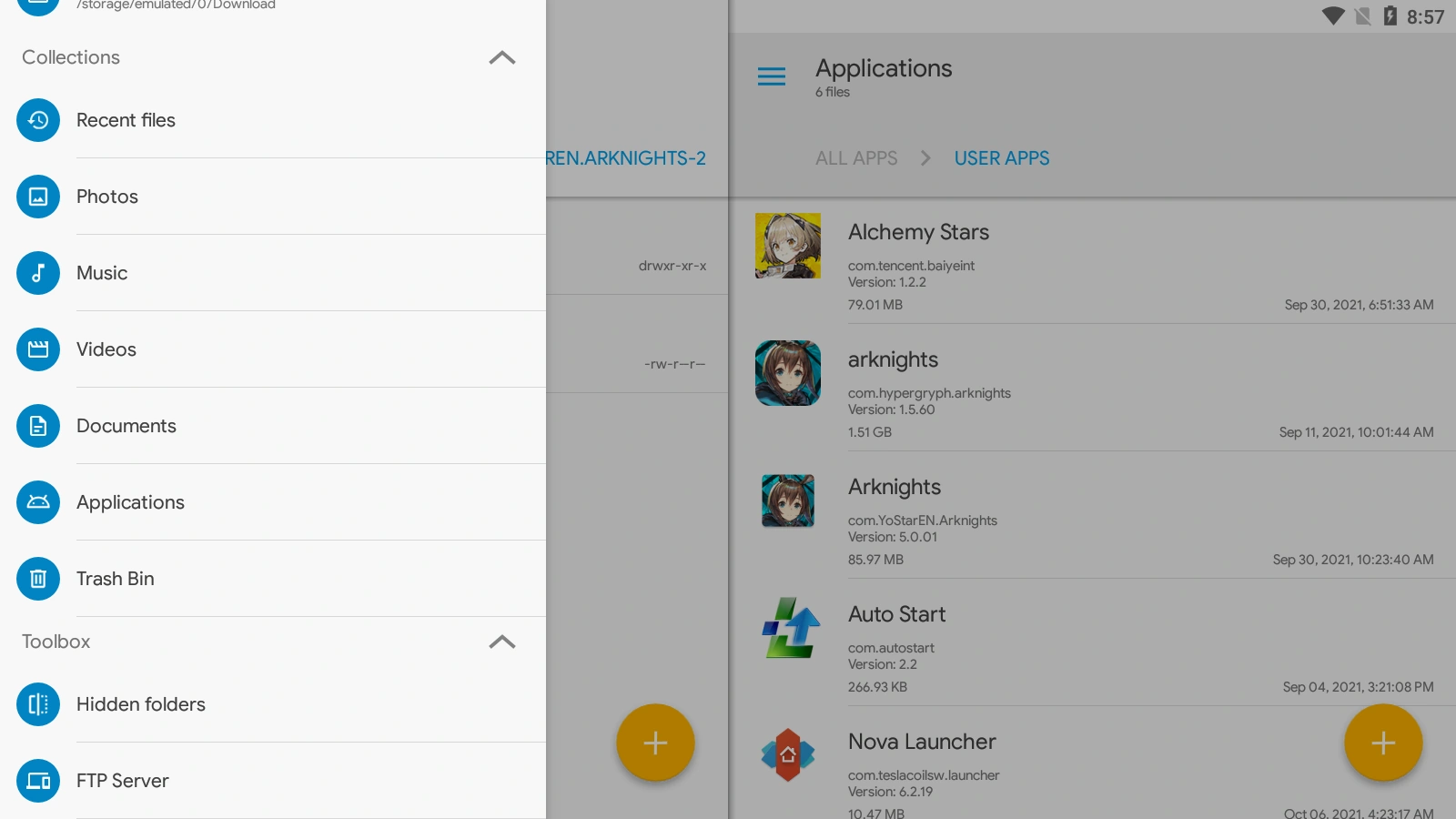

Using Solid Explorer's Applications explorer menu to retrieve the Arknights APK without root access.
We do not recommend any one Android emulator in particular, but do warn you that most, if not all of these emulators are riddled with intrusive advertisement and are known for shady privacy practices. Use emulators at your own risk for your data, and we recommend avoiding purchasing items with real money using these — there have been no reports of theft through this, but it is nonetheless not advisable. Nevertheless, they provide certain ergonomic advantages, such as the ability to play with a mouse and keyboard (by binding certain actions or button presses to keyboard keys), video recording, and the ability to play Arknights without mobilizing your phone's battery and screen.
If you want to "ensure" some amount of safety, we recommend a semi-advanced method to do so: you may use the Windows Firewall to exclude the GUI executable from accessing the Internet. Most of these emulators use two separate executables that make multi-instance emulation simpler: a "GUI" executable which serves as your user interface, and a "headless frontend" which effectively is a VirtualBox instance preset with everything working for Android game emulation, this is the actual emulator. It is up to you to use your Task Manager to discern which is which (most likely, the headless frontend will be using most of the CPU and RAM and describe itself as such), and following this guide is at your own risk. You can safely block the GUI from accessing the Internet, but it is not possible to disconnect the headless frontend without also being unable to log into Arknights.
Most of these emulators also come with their own adware-riddled Android launcher, which we recommend you uninstall after enabling root access and replace with another, such as Nova Launcher. Lastly, you may attempt to uninstall system apps that you think are trackers, but we advise against it unless you know what you're doing, it may break your Android installation. You may also attempt to install, or use the built-in Android firewall to exclude every app from accessing the Internet except Arknights itself and the Google Play Store for updates.
This advice works for most emulators from experience, but not all of them may work the same, and you should verify whether or not this advice is actually applicable.
For the sake of setting up multiple instances without going through the trouble of re-downloading the game every time, you can back up the game files. This process is, to our knowledge, impossible on iOS due to Apple's design policy of abstracting and obfuscating files from the user, so this guide will only work on Android. You will find game content at the following locations:
- For the EN version:
- Internal Memory/Android/obb/com.YoStarEN.Arknights/main.72.com.YoStarEN.Arknights.obb contains the additional content file.
- Internal Memory/Android/data/com.YoStarEN.Arknights/files and all its subfolders contains all post-launch content downloaded after the patching process.
- The application's APK file itself can be easily found using most file explorers, and otherwise, if you have root access, is stored in root/data/app/com.YoStarEN.Arknights-2/base.apk.
- For the CN version:
- There is no additional content OBB file, as everything is stored in the APK.
- Internal Memory/Android/data/com.hypergryph.arknights/files and all its subfolders contains all post-launch content downloaded after the patching process.
- The application's APK file itself can be easily found using most file explorers, and otherwise, if you have root access, is stored in root/data/app/com.hypergryph.arknights-1/base.apk.
Registration
While you may begin playing the game at any time using a guest account, it is needed to bind your account once you have decided on keeping the account. You may decide to postpone this temporarily to reroll (start new accounts until your initial line-up is the way you want it). If you keep delaying this process, you may find yourself losing your unbound account to an update or a loss of cache.
We highly recommend registering with a Yostar account, which requires an email address, rather than a Facebook or Twitter account, for the reason that these may arbitrarily ban or suspend you (as of current situation, it's highly advised to not use Twitter account bind due to changes in Twitter API policy) from their platform, which renders logging in on another device using these credentials impossible. You should always be able to fall back on a Yostar account. Naturally, since you can bind multiple accounts, you can always log in to any device using the other two, but you will want to have a backup plan should they fail you.
If you're looking to reroll, you can easily dummy bind without creating multiple throwaway emails by salting emails on compatible services, such as Gmail. Salting is done by appending your email address, say, myusername@gmail.com with a +#, where the # is a number incremented every time. For example, myusername+3@gmail.com will still send emails to myusername@gmail.com, but Yostar considers them different emails, and different accounts.
Resetting data to reroll, you can clear app data in the storage section of the app settings (which will begin the patching process anew) and reset your advertiser ID. Please note that you cannot skip this patching process, as backing up the files and putting them back in their place will simply log you back into the login credential you just deleted. To delete the app settings, on Android, go to your settings, the Applications submenu, Arknights, Storage, and clear app data. Do not delete anything else. Then, go to Google settings, Ads, and reset your advertising ID. Rerolling on iOS is difficult, and even next to impossible sometimes, likely due to iCloud. It is heavily recommended that you do not reroll on iOS.
Rerolling advice
If a specific Operator attracts you, you may safely ignore this advice. However, if you do not care for any operator in particular, care for all of them, or are a little lost as to who to roll for as a beginner, this section is here to help you.
When you first roll, you will be greeted with the Newbie Headhunting banner, as follows:
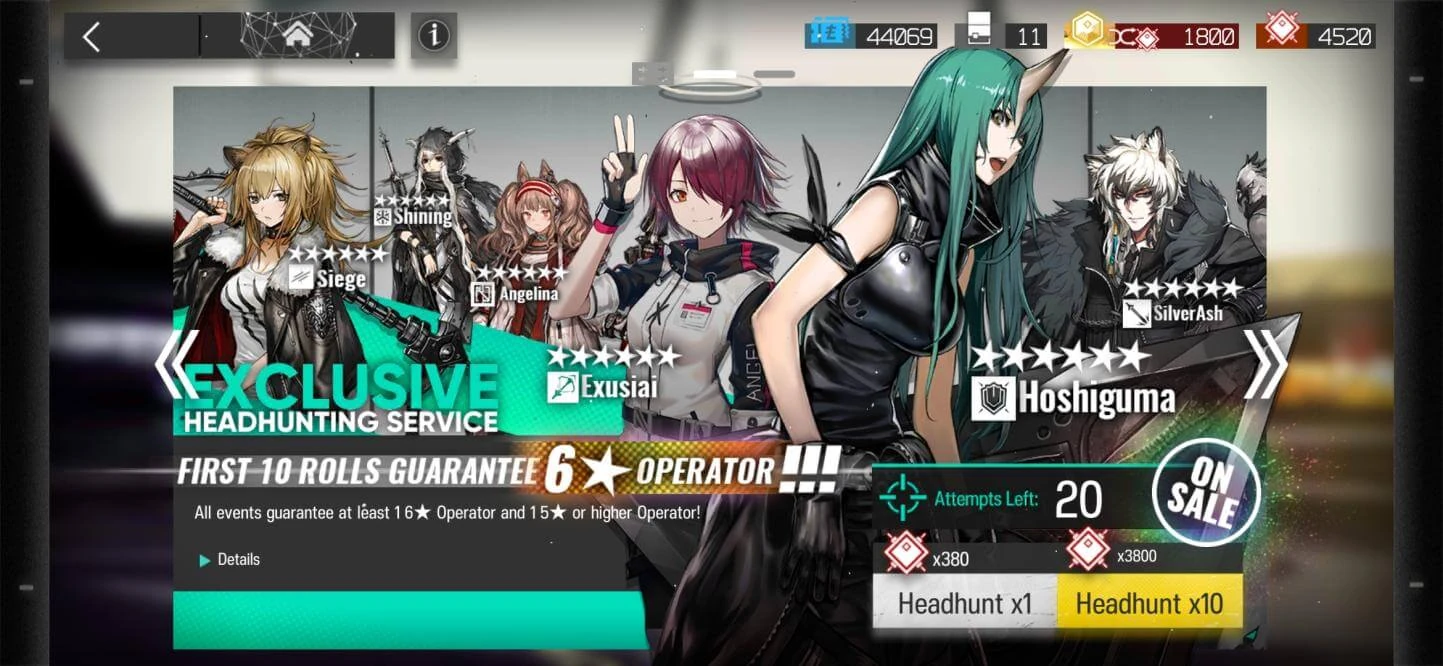

The Newbie Pool has specific mechanics, namely that you can only roll on it 21 times (one of which the tutorial demands that you do) and it does not go away until you have done every roll. Rolls on it are discounted, costing 380 Orundums instead of the usual 600. It also guarantees one of the 6★ operators portrayed above. This banner will not go away until you have rolled 20 times, so you may safely postpone it to instead roll for another banner which sparks your interest. However, you should ask players for their opinion, as some units are great for kickstarting accounts, and others not so much, more so being solid additions to an already well-rounded roster, and the game will not tell you which are which, and only experience allows one to know.
The featured operators of the Newbie Pool are:
- Angelina, a Supporter who slows enemies. She is serviceable before her first promotion, and her second skill sees some mildly niche use, but her main skill comes at Elite 2. Overall, Angelina is a decent unit to start with that serviceably fulfills her subclass' role, and a very good long-term addition.
- Exusiai, a Sniper who focuses on rapid-fire and dispatching drones. Exusiai is extremely strong right out of the gate, and will heavily help throughout most of the early game content. However, her subclass' usefulness has somewhat fallen off in late game and difficult content, due to her focusing on small but sustained physical damage bursts over slow but heavy hits. She is a short-term pick that still sees some semi-frequent use in the long term when aided by buffers that circumvent her principal failings.
- Hoshiguma, a Defender. There is not much to say about Hoshiguma. She tanks, she tanks very well. Most of her strength comes from focusing heavily on being a tank, and she is very good at it. She also does a fairly good amount of damage for a Defender, at least against most middling enemies. Hoshiguma is immediately serviceable in the short term, and only gets better with promotions. However, her hard focus on Defense and lack of versatility makes her a more niche pick in late game content where you might want your Defender to do something more.
- Shining, a single-target Medic. Shining is the game's resident Defense buffer, increasing the Defense of Operators in her range. Shining is a solid addition that can ease the pressure of early game maps pitting lots of damage against unleveled operators, but she is in the long term, a very niche operator. She hits her power spike after her first promotion, which makes her more of a medium-term pick. Shining is, overall, one of the aforementioned "good unit to round up an already solid team" rather than an account kickstarter.
- Siege, a Vanguard. Siege is a very strong unit as far as Vanguards go, due to being almost a Guard with her extremely strong stat distribution that makes her able to sustain much longer than other Vanguards, long after they need to be replaced with heavier damage and tankier tanks. Nevertheless, she is becoming more and more of a niche pick in the long run, and is overshadowed by content design moving away from what she provides and closer to what Vanguards released after her do. Despite that, she is not a bad unit by any stretch, and will be extremely good in the medium term.
- SilverAsh, a Guard who attacks at a small range. While he does this basic job before promotions, it is truly after getting his third skill, at Elite 2, that SilverAsh shines. SilverAsh may be a bit underwhelming before promotions due to only being good for his 6★ stats among your team and having a relatively situational second skill (which can be used to complement his basic abilities by allowing him to recuperate between battles), his third skill opens up one of the strongest early game cheese potential, and is still used to this day in late and endgame content. SilverAsh is, undoubtedly, a long-term pick.
Tips, tricks, and recommendations
- For perfect optimization; it is extremely difficult to avoid it at the start of the game, but we recommend that you keep your Sanity below cap at all times. Every six minutes spent above cap is a point of Sanity not gained, which technically slows down progress you could have made.
- However, taking this too seriously might turn Arknights into a chore, rather than a game. Take a breather before you burn yourself out. Overcapping is not that big of a deal.
- In general, heed the point below:
- There is no such thing as permanently harming your account. Even if you've done something inefficient, it's not the end of the world.
- The only thing irreversible is upgrading certain base facilities, which can lock you out of base setups that require not upgrading them.
- It is recommended that you keep your entire team at an even level, not focus heavily on one Operator. You may allow your highest rarity "carry" operators to grow some levels above your overall team, but they cannot carry you that hard.
- If you're not sure whether to spend a currency, ask around. Most currencies are easily renewable either way, even if some are scarcer than others.
- It is typically not recommended to spend Originite Prime to refill Sanity, unless you intend to buy it with real money. Originite Prime is best spent on Outfits and on the Pro Leveling Packs — which you should prioritize over converting Originite Prime into Orundum, as the Leveling Packs contain the equivalent of their Originite Prime price in Orundums and then some extra rewards.
- Unless you're actively saving for something, it is recommended to roll to your 5★ guarantee on banners, provided your Orundum counter allows. New units are always valuable. If you have everyone on the banner, which is not likely as a beginner player, you may consider skipping the banner.
- Following tier lists and "meta" recommendations without questioning them is a terrible idea. While it is generally true that it simply cannot hurt to have meta-viable operators, most accounts' starting rosters will be different, and you should cover for your weaknesses instead. Typically, even the strongest Operator cannot carry you through every map, and not singlehandedly, especially not if kept at a low level due to the lack of resources inherent to a beginner account.
- It is heavily recommended to upgrade your base, and therefore farm Carbon when you can, because having an un-upgraded base throttles your progress significantly more than not farming Battle Records and LMD. The base can produce a very steady amount of certain resources, which, with a sufficiently efficient setup, can negate the need for farming these resources entirely — some players rarely ever farm LS and CE maps!
- Use a list of Tag Combinations to know which Operators are or are not guaranteed by the tag combinations before recruiting.
- Even if you do not have 3★ operators at maximum potential, you do not need to actively seek these out; they will come in due time eventually. Most veteran players have had these long ago. If the tag pool does not guarantee anything above 3★, you may safely not input any tag and input the minimum time of 7 hours and 40 minutes instead of 9 hours. Each tag, and every ten minutes added increases the LMD cost of the recruitment. This is the most cost-efficient method of recruiting 3★ operators.
- ANY AND ALL TAGS MAY DROP if you do not input 9 hours. Top Operator may be guaranteed to never drop, it will very likely drop if you input less than 9 hours.
- Using Expedited Plans should be reserved for speeding up the more uncommon tag guarantees. If you spend all your Expedited Plans whenever you can, you will run out of them. Recruitment Permits are a rather scarce currency because there is no actual way to farm them, and speeding up all your recruitments will just ensure you run out of them faster, nothing more.
- If you have tag combinations ensuring several operators, try to go for new operators, rather than potentials. The former are always more valuable by a significant margin.
- We recommend that, after upgrading your base fully, you keep at any time a supply of 80 drones at the ready for speeding up the creation of 4 Dualchips, which is the most that an operator can require, as only 6★ ask as many as 4. The cost of speeding up the production of Dualchips is 20 drones per chip. Of course, if you know you will not log in for an extended period of time, you may safely use all of them to avoid overcapping.
Afterwords
And that's it, you have entered the world of Terra as Doctor! You may now play the game at your own pace, but for further guidance, you may check out in the Beginner's Guide that we prepared here. Enjoy the game!